Fruit merge unblocked
Looking for a fruit merge game unblocked at school or work? This one is a web page. Press Play and it loads right here.
About 22 MB
on the first load
Fruit merge unblocked: why it opens where other games don't
If you want merge fruit unblocked on a school laptop, the thing that matters is how the game reaches you. Some games need an app, a browser extension or a launcher. This one runs inside the page, in your browser. There is nothing to download, no plugin to install and no login.
Press Play and the game loads right here. The first time, that is about 22 MB. Until you press the button nothing is loaded, so the page itself opens quickly even on a slow connection.
Because it is an ordinary page, you open it the way you open any other: type the address or follow a link. You do not need to find a file, unzip anything or run an installer, and you do not need permission to put anything on the computer.
There is no account to make, so there is no password to forget and no email address to type in. If you are on a shared computer, you can play and close the tab, and nobody has to set anything up for the next person.
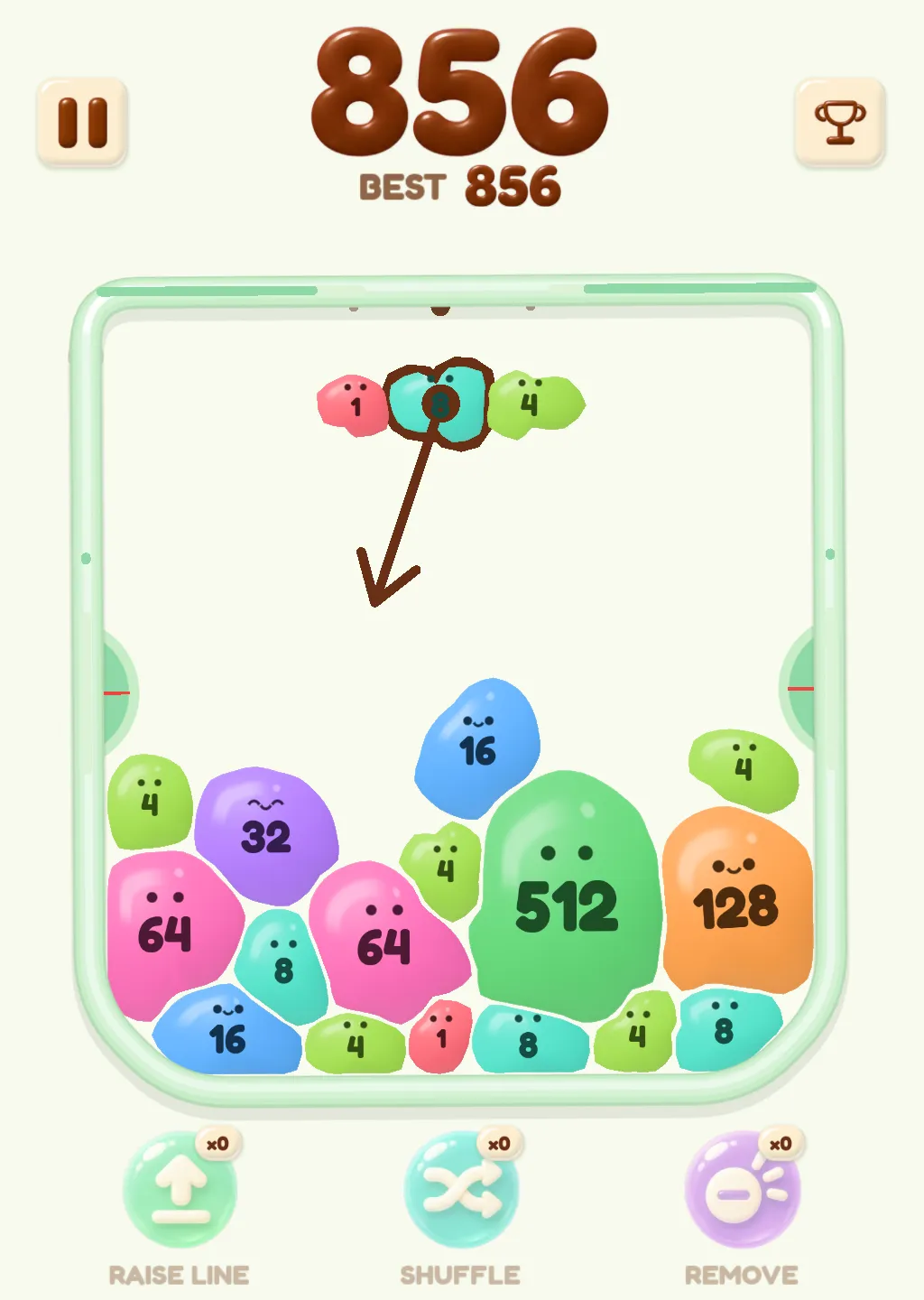
It is the same Squish Merge game as everywhere else on this site: numbered blobs instead of fruit, press and hold, pull down, release. If you came looking for a fruit merge game unblocked, the name is the only part that is not quite true to the game. There is no fruit in it. Every blob carries a number, and the numbers are what you merge.
What you are playing
Squish Merge has three rules, and you can learn them in one run.
Rule 1: a row of blobs waits above the jar. Press one and keep holding, pull down to aim, and let go to launch it into the jar. If the aim looks wrong, drag back before you let go and the launch is cancelled.
Rule 2: every blob has a number, and the numbers go 1, 2, 4, 8, 16 and on up. When two blobs with the same number touch, they become one blob with the number doubled. Each merge adds points, and merging again straight away shows a COMBO.
Rule 3: on each side of the jar there is a green half-circle called a presser. When the pile has pressed both of them all the way in, the run is over. There is no timer and no revive, so a run lasts exactly as long as you can keep the pile down.
On a phone or tablet, press a blob with your finger and keep it there. Slide the finger down to pull, watch the arrow, and lift your finger to launch. To cancel, slide back up before you lift.
On a computer, point at a blob and hold the mouse button down. Move the mouse down to pull, and let go of the button to launch. To cancel, move the mouse back before you let go.
The blobs are soft jelly with a shine, a pair of eyes and a mouth. When you pull one down it gets squashed and stretched, and when the pile gets crowded they squeeze into odd shapes. Each number has its own color, so a matching pair is easy to spot across the jar.
A first run usually goes the same way. You launch a few blobs without much plan, notice that two matching numbers made something bigger, and start choosing which blob to press so that it lands against a twin. That is the whole game, and most of the skill is in the choosing.
Your score and your BEST are at the top of the screen. The game starts by showing the controls, so you do not have to remember any of this. Three buttons under the jar, Raise Line, Shuffle and Remove, show ×0 when a run begins.
If it still won't load
Whether a page opens is decided by the network you are on, and we cannot promise that this one opens on every school or work network. A school can choose to stop any website, and that choice is theirs.
If the page will not load, try another device or another network, or come back when you are at home. A phone on its own connection is the quickest way to find out whether the problem is the page or the network.
If the page opens but the game takes a while, wait a moment: the first load is the biggest, about 22 MB. If it still sits there, close the tab, open the page again and press Play once more.
Nothing here needs you to sign in, so a page that stops at a login screen is not this one. If you see something that asks for a password before the game appears, you have landed somewhere else.
If the game loads and then looks wrong, refresh the page. An old browser or a lot of open tabs can slow it down, so closing other tabs often helps.
Not sure how a run goes? How to play fruit merge explains the three rules one at a time, with a screenshot for each. For tips on getting further, the strategy page is next, and the fruit merge game home page has the rest.
Questions
Do I need to download or install anything?
No. The game loads in the page when you press Play. The first load is about 22 MB, and you do not need an app, a plugin or an installer.
Do I need to log in?
No login and no account. Press Play and start. Nothing on this page asks for your name, an email address or a password.
How do I play?
Press a blob in the row above the jar and hold, pull down to aim, release to launch, or drag back to cancel. Two blobs with the same number merge into one with the number doubled.
How do I play on a phone?
Press a blob with your finger and keep it there, slide down to aim, and lift your finger to launch. Slide back up before you lift to cancel. The game picture is tall, so it fits a phone held upright.
How do I play on a computer?
Hold the mouse button down on a blob, move the mouse down to aim, and let go to launch. Move back before you let go to cancel.
How big is the game?
About 22 MB on the first load. Nothing is loaded until you press Play, so the page itself opens quickly.
Is my progress saved?
Your best score and settings are kept in your browser, on your device. Clearing the site data in your browser removes them. There is no account, so nothing follows you to another device.
Is this the same game as on the home page?
Yes. It is Squish Merge, with the same blobs, the same jar and the same three rules. The home page, the how-to page and this page all open the same game.
What happens when a run ends?
A run ends when the pile has pressed both green pressers on the sides of the jar all the way in. There is no timer and no revive, so you can start again whenever you like.
Why is it called fruit merge if there is no fruit?
Because that is what people call this kind of game: you merge things into bigger things. Here the things are soft numbered blobs, and the numbers double each time two of them meet.